

Download Into the Dead 2 (Official Version, 2025) for Android — Survive the Zombie Apocalypse
Into the Dead 2 is a tense, action-packed survival runner that combines arcade-style controls with a cinematic zombie-horror atmosphere. In this guide you'll find everything you need: an overview of the official game, key features and modes, system requirements, tips for surviving longer runs, performance tuning for Android devices, safe download options from official stores, and a clear explanation of the risks associated with hacked or unofficial APKs. This article is focused on the official experience — supporting developers and keeping your device safe.
About Into the Dead 2
Developed by PIKPOK, Into the Dead 2 expands on the original runner formula with a strong narrative backbone, new mechanics, and weapon-based combat layered over the classic forward-running survival gameplay. You move along dynamically generated paths, dodging obstacles and outrunning hordes of undead while using weapons and resources to clear the way. The game blends tense moments with explosive set-pieces, and includes campaign chapters, challenge modes, and frequent live events.
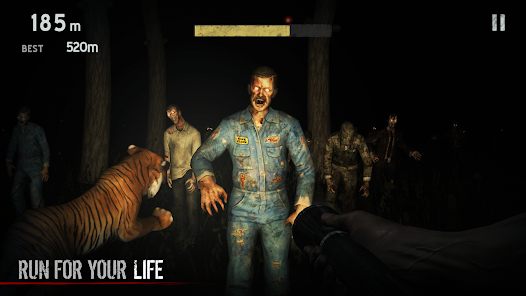
Core Gameplay & Mechanics
Into the Dead 2 keeps controls simple and intuitive: swipe left/right to change lanes, swipe up to jump and swipe down to slide. However, the depth comes from weapon selection, resource management, and environmental hazards. Weapons are consumable — ammunition can be scarce — so you decide when to conserve and when to unload into a crowd. The game also adds vehicles, companion mechanics, and scripted danger sequences that turn runs into mini-movie experiences.
Campaign & Progression
The campaign follows your attempt to rescue family members across a devastated landscape. Each chapter is made up of multiple runs with escalating difficulty, unique objectives, and narrative cutscenes that increase immersion. Progression rewards you with new weapons, perks, characters, and unlockables. Daily challenges and events offer opportunities to earn premium currency and rare gear.
Key Features
- Cinematic Story Campaign: Richly presented chapters that evolve the core running gameplay with scripted moments and cutscenes.
- Wide Arsenal: Shotguns, rifles, machine guns, melee weapons and special gear like flares and grenades.
- Vehicles & Set Pieces: Jump into a vehicle or experience explosive sequences that change the run pace.
- Character Perks: Unlock characters and upgrade their passive perks to improve survivability.
- Daily Missions & Events: Keep returning for rotating events, time-limited modes and seasonal content.
- Leaderboards & Social: Compete with friends or global players for the highest scores.
- Accessible Controls: Simple swipes, great for mobile play yet challenging on higher difficulties.
System Requirements (Android) — Guideline
| Component | Minimum | Recommended |
|---|---|---|
| OS | Android 6.0 (Marshmallow) | Android 10 / 11+ |
| RAM | 2 GB | 4 GB+ |
| Storage | 500 MB free | 1 GB free (for additional assets) |
| CPU / GPU | Mid-range SoC | Snapdragon 600+ or equivalent |
| Network | Internet for events and purchases | Wi-Fi or stable mobile data |
How to Play — Basic Tips for New Survivors
- Conserve ammo: Don't spray on single zombies — pull the trigger when multiple threats appear or when obstacles force you to hold position.
- Use consumables wisely: Grenades, flares and medkits can turn the tide; save them for scripted encounters or dense hordes.
- Upgrade smart: Prioritize upgrades that increase survivability (health, dodge window) before damage boosts.
- Learn enemy behavior: Some zombies lunge, others block; learning attack patterns improves lane choices.
- Replay chapters: Farming earlier chapters with higher star ratings can net resources faster than pushing for the next chapter unprepared.
Weapons & Loadouts
Into the Dead 2 encourages mix-and-match loadouts. Shotguns are perfect for short-range crowd control while assault rifles give reliable mid-range DPS. Sniper rifles are rare but useful for high-difficulty runs where precision matters. Secondary melee weapons are great when you run out of ammo but are risky. Experimentation matters — a balanced loadout (one close-quarters weapon, one distance weapon, and a side consumable) often outperforms all-damage setups.
Events, Seasons & Live Content
The devs keep the game fresh with seasonal events, new chapters, limited-time cosmetic items, and themed skins for weapons and characters. Events often provide exclusive rewards that can't be obtained otherwise — participate actively to collect rare gear. Seasonal event design usually introduces a new gameplay twist (timed explosives, darkness mode, or special enemy types), so read event rules before jumping in.
Monetization & In-App Purchases (What to Expect)
Into the Dead 2 uses a free-to-play model with optional purchases: premium currency, weapon crates, season passes, and cosmetic bundles. You can enjoy most content without spending, but purchases accelerate progression. If you prefer not to pay, focus on daily objectives and event participation for steady resource gains. Avoid third-party “free” offers — they’re often scams and may compromise accounts.
Official sources ensure automatic updates, safe installations, and proper account linking — protecting you from malware and ensuring cloud saves work correctly.
Why Avoid Hacked / MOD APKs?
- Security risks: Modified packages can contain malware, adware, keyloggers, or backdoors that steal data.
- Account safety: Your account can be banned for cheating or using modified clients that alter gameplay or economy.
- No updates or compatibility: Hacks often break with new official updates and can lead to corrupted saves.
- Ethical concerns: Developers and artists rely on in-app purchases and ads to fund continued development — piracy undermines that model.
Performance Optimization on Android
To get the smoothest runs and reduce stutter on Android:
- Close background apps and disable battery saver while playing.
- Use Wi-Fi for online content and events when possible to reduce latency.
- Lower graphics settings if you experience thermal throttling or frame drops.
- Enable any “Performance Mode” on your device (some phones have Game Mode or GPU Turbo enhancements).
- Keep the app and your Android system updated for driver and compatibility improvements.
Troubleshooting — Common Issues & Fixes
- Crashes on startup: Clear app cache, reinstall from Play Store, ensure device meets minimum OS requirements.
- Stuttering during runs: Lower visual effects, close background apps, and restart the device to free RAM.
- Not connecting to events: Check network, disable VPNs that may interfere, and try switching from mobile data to Wi-Fi.
- Lost progress: Verify account link/Cloud Save; if none, check local backup or contact support with device logs.
Accessibility & Controls
The game provides adjustable sensitivity for lane swipes and options to enable larger touch zones. If you find consistent input misses, increase swipe sensitivity or use a controller where supported. Visual accessibility options like contrast and HUD scaling may be available depending on the build — check settings for customization.
Community & Mods (Safe Participation)
While we discourage using hacked clients, joining the official community is strongly recommended. Look for PIKPOK's official channels, subreddit communities, and verified Discord servers for strategies, event tips, and developer announcements. Community-created guides, not modified clients, are an excellent resource.
FAQ
Q: Is Into the Dead 2 free?
A: Yes, the base game is free-to-play with optional in-app purchases. You can play through most content without spending money.
Q: Can I play offline?
A: Some modes allow offline play, but events, leaderboards and purchases require an internet connection.
Q: How do I contact support?
A: Use the in-app support option or visit the official publisher site. Provide device model, OS version, and a brief description to speed up troubleshooting.
Advanced Tips — Maximize Your Runs
- Plan your route: Pay attention to environmental cues; trained runs are about anticipation as much as reflex.
- Balance your upgrades: Invest in one offensive and one defensive perk to survive longer without relying on consumables.
- Use events to farm: Time-limited events often yield premium currency — participate daily for steady growth.
- Master set-pieces: Learn when vehicles appear and how their mechanics work to make the most of scripted sequences.
- Practice perfect dodges: Some hazards demand exact timing; practice in easier chapters to improve muscle memory.
Video — Gameplay & Tips
Final Notes & Safety Reminder
Into the Dead 2 is an excellent mobile survival experience with polished mechanics and steady developer support. To keep your device and accounts safe, always use official sources for downloads and updates. Avoid hacked or modified APKs — they carry serious risks. If you're looking for advice on optimizing runs, strategies for specific chapters, or how to approach seasonal events, join our community channels for step-by-step help.